
WooCommerce and Microsoft Dynamics 365 — a single data set.
The WordPress plugin synchronizes orders, stock, prices and customers between your WooCommerce shop and Microsoft Dynamics 365 — and continues to support Dynamics NAV. Automatically, in both directions, without manual double entry.
Four things that pull shop and ERP apart every single day.
Neither the shop nor Dynamics is the problem — it's the manual work in between.
Orders are entered twice
Every shop order is transferred into Dynamics by hand — customer, line items, addresses, payment. That costs time and produces typos that get expensive later.
Stock levels don't match
The shop sells what the warehouse no longer has — or shows “sold out” while the goods are on the shelf. Both cost revenue and customer trust.
Orders reach the ERP late
Evening orders sit in the shop until the next morning. Picking, invoicing and shipping only start once someone transfers them.
Errors can't be traced
An order is missing, a price is wrong — and nobody knows when or where it happened. Without a log, all that's left is searching.
Everything the synchronization between shop and Dynamics needs.
A plugin in WordPress that connects your WooCommerce directly to Microsoft Dynamics 365 or Dynamics NAV — traceable, in real time, with no intermediate steps.
Seamless integration
WooCommerce and Microsoft Dynamics 365 or Dynamics NAV work from a single data set — orders, products and customers flow in both directions.
Automatic data synchronization
Orders, product stock, prices and customer data are synchronized without manual intervention — on a schedule or event-driven.
Stock synchronization
Stock levels from Dynamics are visible in the shop in real time. No sale without goods, no “sold out” with a full warehouse.
Real-time updates
Product stock and orders are always current — evening orders are already in Dynamics overnight.
Status synchronization
The sync status of every product is visible in the shop — you see at a glance what has been transferred and what is still pending.
Detailed logs
Every sync run is fully logged: what, when, with what result. Errors become traceable instead of mysterious.
Invoice delivery by email
Invoices are sent automatically by email to one or more recipients — customer, accounting, sales.
Real-time notifications
Notifications about orders, errors and sync runs go out by email to multiple recipients — your team reacts before the customer asks.
Fast setup
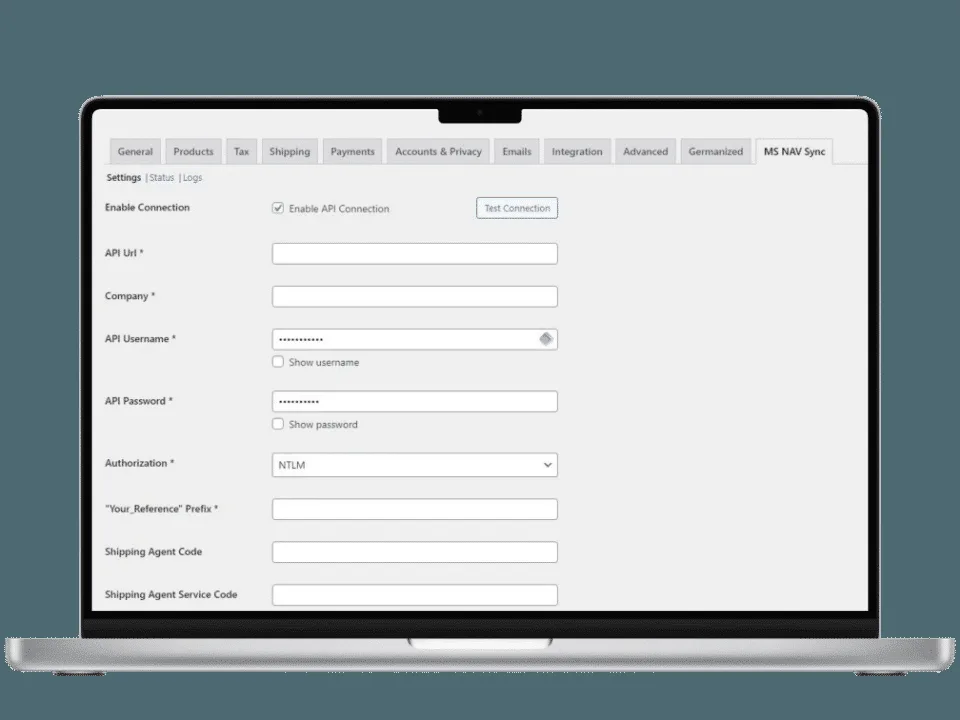
A clear settings page in WordPress: enter credentials, verify the connection, map fields — installation takes minutes, not weeks.
In sync in three steps.
We set up the plugin together with you — including field mapping, a test run and handover to your team.
Install the plugin & connect Dynamics
Activate the plugin in WordPress, enter the credentials for Dynamics 365 or Dynamics NAV, verify the connection.
1 dayMap fields & test run
Products, customers, orders, taxes and payment methods are mapped to your Dynamics structures and tested with real data.
Together with usLive sync & monitoring
Synchronization runs automatically. Logs and notifications show your team at any time what has been transferred.
LiveOrganizations lose time and accuracy when data is moved between shop and ERP by hand. Woo MS Dynamics 365 & NAV eliminates manual data entry: fewer errors, consistent information across all systems, faster order processing — and a team that looks after customers instead of spreadsheets.
Why you need this pluginSystem requirements. WordPress 5.0 or higher, WooCommerce 3.0 or higher, Microsoft Dynamics 365 or Microsoft Dynamics NAV 2016 or higher.
Older NAV versions on requestSecurity. All data between WooCommerce and Dynamics is transferred HTTPS-encrypted. Synchronization runs in the background and does not affect your shop's performance.
Data protection by best practiceWhat you want to know before you start.
What is Woo MS Dynamics 365 & NAV?
A WordPress plugin that connects Microsoft Dynamics 365 (and Dynamics NAV) with WooCommerce and automates data synchronization for stock, orders and customer data. Your shop and your ERP work from the same, current data.
Why do I need this plugin?
Because manual work between systems produces errors and delays. The plugin reduces errors through automatic synchronization, saves your team the manual data entry, keeps information consistent across all platforms and keeps customers happy with accurate stock levels and timely order processing.
Which Dynamics versions are supported?
Microsoft Dynamics 365 as well as Microsoft Dynamics NAV from version 2016. On the WordPress side, WordPress 5.0 and WooCommerce 3.0 or higher are required.
How secure is the data synchronization?
All data between Dynamics and WooCommerce is transferred HTTPS-encrypted. Credentials are stored in WordPress, not with third parties, and we follow best practices for data protection and data security.
Does the plugin affect my shop's performance?
No. Synchronization runs in the background and is optimized for efficient operation — your customers won't notice a thing.
What happens after the trial period?
After the 14-day trial you choose one of our plans — or cancel with no obligation. Setup, field mapping and adaptations to your Dynamics structures are offered as a project service.
See the synchronization with your Dynamics.
We show you the settings page and a sync run, clarify your Dynamics version and fields, and prepare a quote for plugin, setup and operation.
- 1Submit the form — shop URL and Dynamics version are enough.
- 2We get back to you within one business day with a demo and follow-up questions.
- 3You receive a quote for plugin, setup and maintenance.
🔒 GDPR-compliant — hosting in Europe, your inquiry is used solely to process your request.
ERP connected — what's next?
We look after WooCommerce shops from setup through performance and security to maintenance. And with InsightHub your shop gets an AI advisor that knows your real catalog.